BACKBAND
A downloadable tool for Windows
BACKBAND - the practice band that makes you a better guitarist
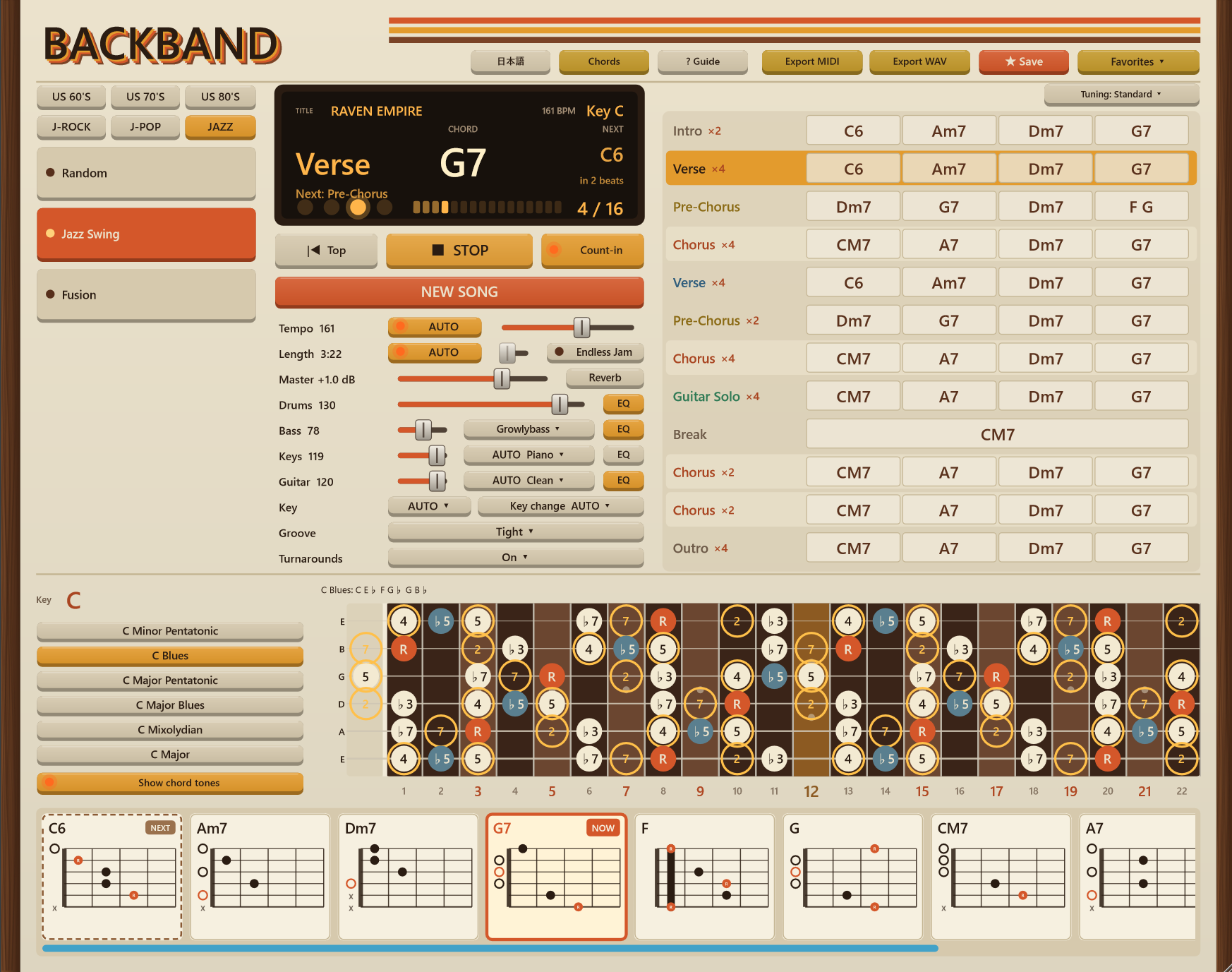
Pick a feel, press NEW SONG, press PLAY. A full band - drums, bass, keys and two rhythm guitars - plays a brand-new 3-5 minute song with you. The chord now, the next chord, the scale and the chord tones are on the screen, big. You don't have to stop and think. You just play - and you get better at improvising, song after song.
No more hunting YouTube for backing tracks. Every style, every tempo and every key you want is one click away, with the chart in front of you.
One-time purchase. Free updates. Works offline - no account, no subscription.
WHY YOU GET BETTER
1. You never get the chance to think "I can't".
Most players stall because they try to work out the theory while they play. The hands can't keep up, it feels too hard, and they give up. BACKBAND does the thinking on screen: the chord you're on in big letters, the next chord and how many beats until it changes, the scale on the neck with the chord tones lit as the changes go by. You play first and understand as you go.
2. A little pressure, every single time.
Every song is new, so you can't memorize it. You have to listen, look ahead and react - like a real session with a real band. That gentle push is what makes your ears and your hands faster.
3. Lots of reps - and it's fun.
A new song is one click away, so you can play a dozen songs in one evening, in styles you'd never pick on your own: blues, neo-classical, funk, Showa kayo, jazz swing. Experience piles up while you're enjoying yourself.
"I built BACKBAND for myself. In a short time I went from sticking to my usual licks to ad-libbing over blues, neo-classical, jazz and J-pop. If I can do it, you can." - the guitarist who made it
ABOUT 29 MILLION SONGS
Every press of NEW SONG picks one of 999,998 song numbers for the feel you chose. With 29 feels, that's about 29 million different songs - before you touch the tempo, the length, the key or the chords. At ten new songs a day, it would take you around 8,000 years to hear them all.
We checked: we made 600 songs in a row, and all 600 had different chord progressions.
The songs aren't written by AI. They come from music theory - the progressions, turnarounds and key changes real songs use, put together by rules and checked by ear.
BACKBAND vs. A YOUTUBE BACKING TRACK
- No searching, no ads - pick a feel and play
- Any tempo, any key, any length - change them while you play
- The chart, the next chord and the scale on screen - a video only gives you sound
- A new song every time - you can't play on autopilot
- Don't like a chord? Click the bar and change it - the band follows
- Endless mode - the band never stops until you do
WRITE AND RELEASE YOUR OWN MUSIC
MIDI export is our top tip. Export the song and you get drums, bass, keys and guitar as MIDI, plus the chart as text. Open it in your DAW, swap the sounds, rearrange it, write a melody on top - and release it or sell it. Everything you make with BACKBAND is yours to use, commercially too.
Export WAV gives you the band as you hear it, ready to jam over anywhere.
MAKE IT SOUND BIG
The band sounds good out of the box, and better when you shape it: a 3-band EQ on every instrument, reverb, a master level with a limiter that never clips, three bass sounds, piano / organ / e-piano / synth, clean / crunch / drive guitar, and Tight / Pocket / Loose groove. A few minutes of tweaking turns it into a band with real punch.
EVERYTHING IT DOES
The band
- Drums, bass, keys and two rhythm guitars (double-tracked left and right, the middle left clear for you)
- 29 feels in six tabs: US 60'S (blues, rock 'n' roll, Merseybeat, soul, surf), US 70'S, US 80'S (arena rock to neo-classical), J-ROCK, J-POP (Showa kayo to vocarock), JAZZ (jazz swing, fusion)
- Full songs with intro, verses, choruses, solo, break and ending
- Key changes: Auto / On / Off - set up properly (V7, or bVI-bVII) the way songs do it
- Turnarounds that lead into each new section
On screen, readable at a glance
- The chord now, big - with the next chord and how many beats until it changes
- How far into the section you are, big: "3 / 8", and which section comes next
- The whole chart on one screen, one line per section - no scrolling with your hands full
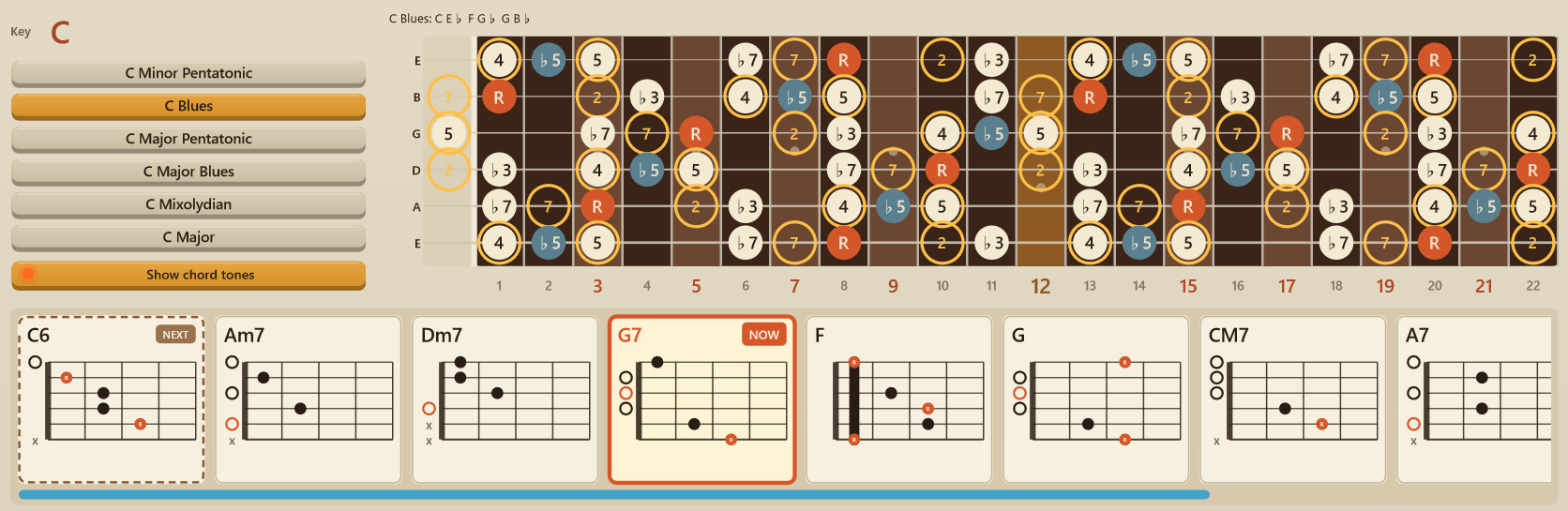
- Scale shapes for the song's key on the neck, labelled by degree, with the chord tones lit
- A row of chord shapes under the neck: every chord of the song, with NOW and NEXT lit
Learn as you play
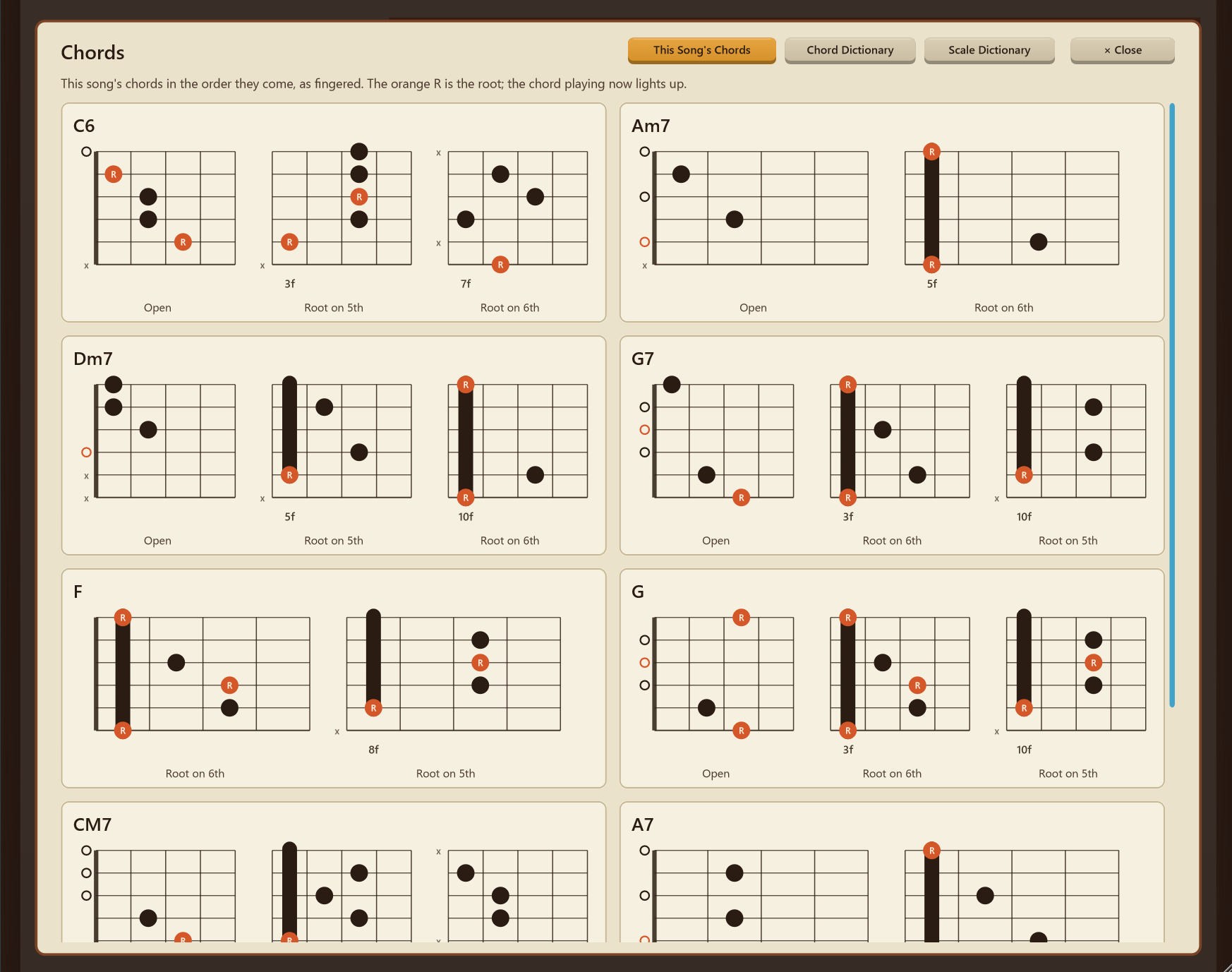
- This song's chords, with up to three ways to finger each
- A chord dictionary: 16 kinds of chord on any root
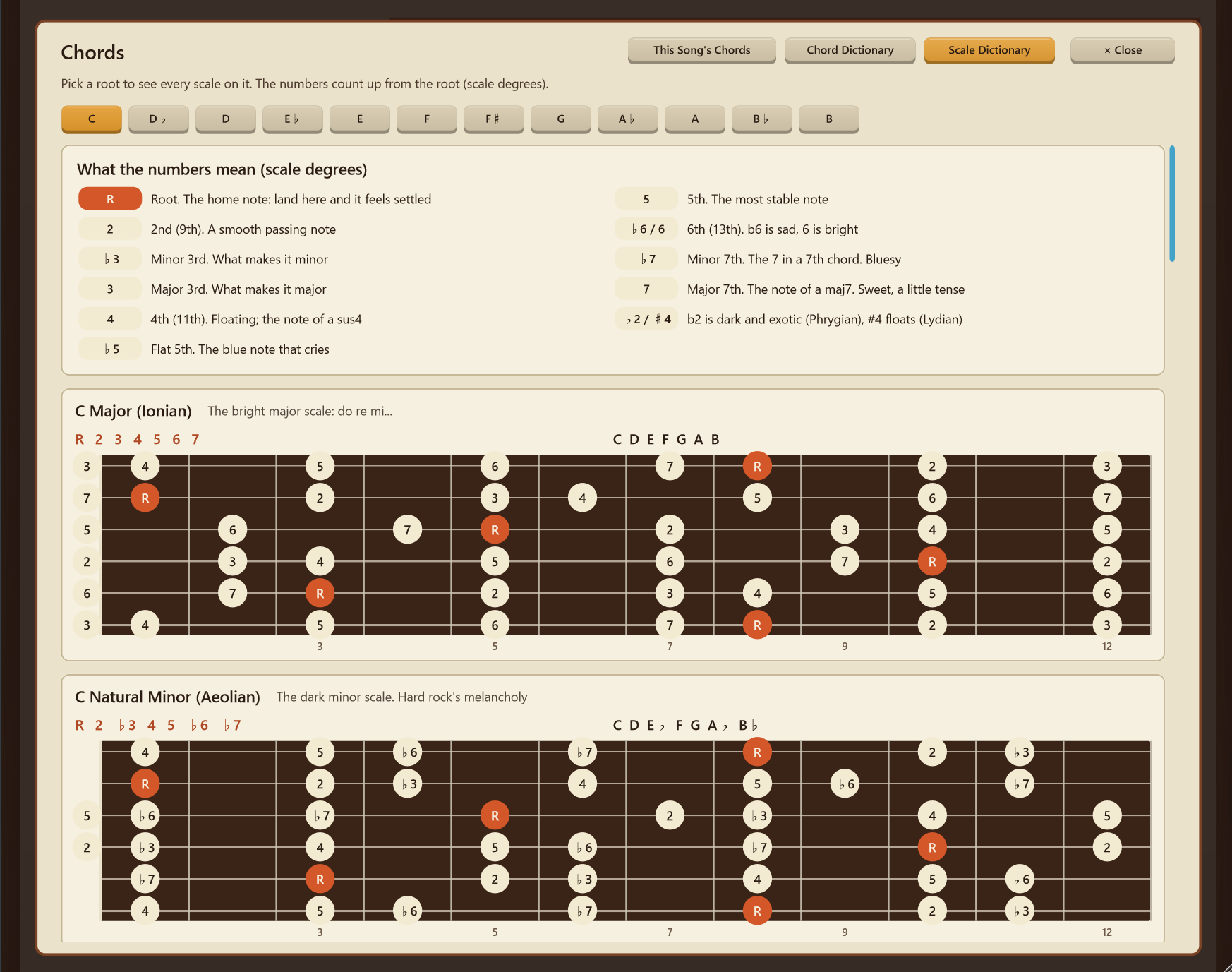
- A scale dictionary: 18 scales, when to use each, and what every number on the neck means
You're in control
- Click any bar to put in your own chord - bass, keys and guitars follow
- Tempo (also while playing), length and key - automatic or set by you
- Tuned down a half or whole step? The chart stays in the shapes you finger
- Endless mode for long jams
Save and export
- Save the songs you like (chords, tempo, key and feel) and bring them back from Favorites any time - practise over the same song until you own it
- Export MIDI (with the chart as text) and WAV - commercial use OK
And
- English and Japanese
- Light on your PC - every new sound is measured so the app stays light
FREE UPDATES
Buy once and every update is free. More feels and genres are on the way. New instrument sounds are planned too, though I can't promise when.
Coming in 1.2: the app tells you when a new version is out, and Save will also keep your sound (levels, EQ, reverb, tones).
Follow BACKBAND here on itch.io to hear about new feels and updates.
TRY IT FIRST
The free demo plays the whole band with one feel per tab. MIDI/WAV export, Favorites and Endless mode are in the full version.
SYSTEM
- Windows 10 / 11 (64-bit)
- Screen 1280x720 or larger
- About 700 MB of disk space after unzipping
- Your guitar stays on your own rig - play through your amp or audio interface as usual
HOW TO INSTALL
- Unzip the file anywhere you like
- Open the BACKBAND folder and run BACKBAND.exe (keep the Sounds folder next to the app)
Windows may say "Windows protected your PC" the first time - click "More info", then "Run anyway".
TROUBLE?
If it won't start or there's no sound, tell me in the comments below.
SOUNDS
Recorded drums, basses, guitar and upright piano (all CC0 libraries by Karoryfer Samples and Versilian Studios), plus organ, e-piano and synth made by the app itself.
HOW IT'S MADE
BACKBAND is built by a guitarist with AI coding assistance. The musical rules - progressions, turnarounds, key changes and feels - were chosen and checked by ear, playing along.
日本語
BACKBAND(バックバンド)- ギターがうまくなる練習バンド
ノリを選んで「新しい曲をつくる」、「PLAY」を押すだけ。ドラム・ベース・鍵盤・ギター2本のバンドが、毎回ちがう3〜5分の曲を一緒に演奏します。今のコード、次のコード、スケール、コードの音が、画面に大きく出ます。止まって考えなくていい。弾いているうちに、アドリブがうまくなります。
もう YouTube でバッキングトラックを探さなくていい。好きなジャンル・テンポ・キーが、ワンクリックで、コード表つきで鳴ります。
買い切り。アップデートは無料。ネット接続もアカウントも不要です。
なぜ上達するのか
1.「できない」と思うひまがない
弾きながら理論を考えると、手が追いつかず、むずかしく感じて、あきらめてしまいがちです。BACKBAND は考える部分を画面が引き受けます。今のコードを大きく、次のコードと「あと何拍」、指板にはスケールと、今鳴っているコードの音。先に弾いて、弾きながら分かっていきます。
2. 毎回、ちょっとだけ追い込まれる
曲は毎回新しいので、覚えて弾くことができません。聴いて、先を読んで、反応する。本物のバンドとのセッションと同じです。このほどよい追い込みが、耳と指を速くします。
3. 数をこなせる、しかも楽しい
ワンクリックで新しい曲。ひと晩で十数曲、自分では選ばないジャンルにも出会えます(ブルース、ネオクラシカル、ファンク、昭和歌謡、ジャズ)。楽しみながら経験が積み上がります。
「自分のために作りました。いつものフレーズしか弾けなかった私が、短い期間でブルースもネオクラシカルもジャズも J-POP も、アドリブで弾けるようになりました。私にできたのだから、あなたにもできます。」 - 作ったギタリストより
曲は約2,900万通り
「新しい曲をつくる」を押すたびに、選んだノリの中から 999,998 通りの曲番号のひとつを引きます。ノリは29種類なので、約2,900万曲。テンポ・長さ・キー・コードを変える前の数です。1日10曲ずつ聴いても、全部聴くには約8,000年かかります。
実際に600曲を続けて作って確かめたところ、600曲すべてコード進行がちがいました。
曲は AI で作っていません。実際の曲で使われるコード進行・つなぎ・転調を、音楽理論のルールで組み立て、耳で確かめています。
YouTube のバッキングトラックとのちがい
- 探さない、広告なし。ノリを選んで弾くだけ
- テンポ・キー・長さは自由。弾いている途中でも変えられる
- コード表・次のコード・スケールが画面に出る(動画は音だけ)
- 毎回新しい曲なので、手グセで流せない
- 気に入らないコードは、構成表のマスをクリックして変えられる。バンドもついてくる
- エンドレスモードで、止めるまでずっと演奏
自分の曲づくり・販売にも
いちばんのおすすめは MIDI 書き出し。ドラム・ベース・鍵盤・ギターの MIDI と、コード表のテキストが出ます。DAW で開いて音色を差し替え、アレンジして、メロディを乗せれば、そのまま自分の曲として発表・販売できます。BACKBAND で作った曲は、商用でも自由に使えます。
WAV 書き出しで、聞こえているままのバンドの音も保存できます。
迫力の音に
楽器ごとの3バンド EQ、リバーブ、リミッターつきのマスター音量、ベース3種、ピアノ/オルガン/エレピ/シンセ、ギターはクリーン/クランチ/ドライブ、ノリはタイト/ふつう/ルーズ。少しいじるだけで、迫力のあるバンドの音になります。
できること(全部)
バンド
- ドラム・ベース・鍵盤・ギター2本(左右に分けて、真ん中はあなたのギターのために空けてある)
- 29の曲調:US 60'S(ブルース、ロックンロール、マージービート、ソウル、サーフ)、US 70'S、US 80'S(アリーナロックからネオクラシカル)、J-ROCK、J-POP(昭和歌謡からボカロック)、JAZZ(ジャズスウィング、フュージョン)
- イントロ・Aメロ・Bメロ・サビ・ソロ・ブレイク・エンディングまでそろった曲
- 転調(AUTO/あり/なし)。V7 や bVI-bVII で、本物の曲のように準備してから上がる
- パートの変わり目に入るつなぎのコード
ぱっと見て分かる画面
- 今のコードを大きく、次のコードと「あと何拍」
- パートのどこにいるかを大きく「3 / 8」、次のパートも表示
- 構成表は1パート1行、スクロールなしで全体が見える
- キーに合うスケールを指板に表示(度数つき)、コードの音が光る
- 指板の下に、この曲のコードの押さえ方(「今」と「次」が光る)
弾きながら覚える
- この曲のコードの押さえ方(1つのコードに最大3通り)
- コード辞典:どの音からでも16種類
- スケール辞典:18スケール、使いどころ、指板の数字の意味
自由に変えられる
- 構成表のマスをクリックしてコードを差し替え(ベース・鍵盤・ギターもついてくる)
- テンポ(演奏中も)・長さ・キーは、おまかせでも自分で決めても
- 半音下げ・一音下げでも、コード名はいつもの押さえ方のまま
- エンドレスモードで長いジャム
保存と書き出し
- 気に入った曲(コード・テンポ・キー・ノリ)は「保存」で残して、「お気に入り」からいつでも呼び出せる。同じ曲で弾き込める
- MIDI(コード表テキストつき)・WAV 書き出し。商用利用OK
そのほか
- 日本語/英語
- 軽い。音や処理を足すたびに重さを測っています
アップデートは無料
一度買えば、アップデートはずっと無料です。曲調・ジャンルはこれからも追加します。新しい楽器の音も追加する予定です(時期はお約束できません)。
1.2 から:新しい版が出るとアプリがお知らせします。「保存」で音作り(音量・EQ・リバーブ・音色)も残せるようになります。
itch.io で BACKBAND をフォローすると、新しい曲調やアップデートのお知らせが届きます。
まずは体験版で
無料の体験版では、各タブ1つの曲調でバンド全体を試せます。MIDI・WAV 書き出し、お気に入り、エンドレスは製品版のみです。
動作環境:Windows 10 / 11(64bit)、画面1280×720以上、空き容量 約700MB。ギターはいつものアンプやオーディオインターフェースでそのまま弾けます。
インストール:zipを好きな場所に展開して、BACKBANDフォルダの BACKBAND.exe を起動(Sounds フォルダはアプリの隣に置いたまま)。初回に「WindowsによってPCが保護されました」と出たら、「詳細情報」→「実行」を押してください。
起動しない・音が出ないときは、下のコメント欄で教えてください。
作り方について:BACKBAND は、ギタリストが AI のコーディング支援を使って作りました。コード進行・つなぎ・転調・曲調のルールは、実際に一緒に弾きながら耳で選んで確かめています。
Purchase
In order to download this tool you must purchase it at or above the minimum price of $29.99 USD. You will get access to the following files:
Download demo
Development log
Leave a comment
Log in with itch.io to leave a comment.